


ZCP now has 64 live marketplace application images.
Start a VM with GitLab, WordPress, PostgreSQL, Grafana, Keycloak, OpenBao, or Docker without building the base server by hand first.
The marketplace is not a separate SaaS layer. It is still Infrastructure-as-a-Service. You get a normal VM, full SSH access, your own network rules, your own storage, and the ability to change anything after deployment.
The marketplace removes the repetitive setup work by shipping it inside a maintained image.
Why marketplace images matter
Most teams have installation steps already. The harder part is making the same operational decisions every time:
- Which OS version should we use?
- Which packages need to be installed before the app?
- Where are generated credentials stored?
- Which service starts after reboot?
- Which ports should stay closed by default?
- How do we document the first login?
- How do we repeat the same install next month?
An app template turns those decisions into a repeatable starting point.
You still own the workload. ZCP provides the prepared image, the VM, the network, and the documentation. You decide the plan size, firewall rules, storage layout, domain name, backup policy, and hardening model.
How it works
When you create an instance in the ZCP portal, open the Marketplace Apps tab and pick the app you want to deploy. Each app card includes a version selector.
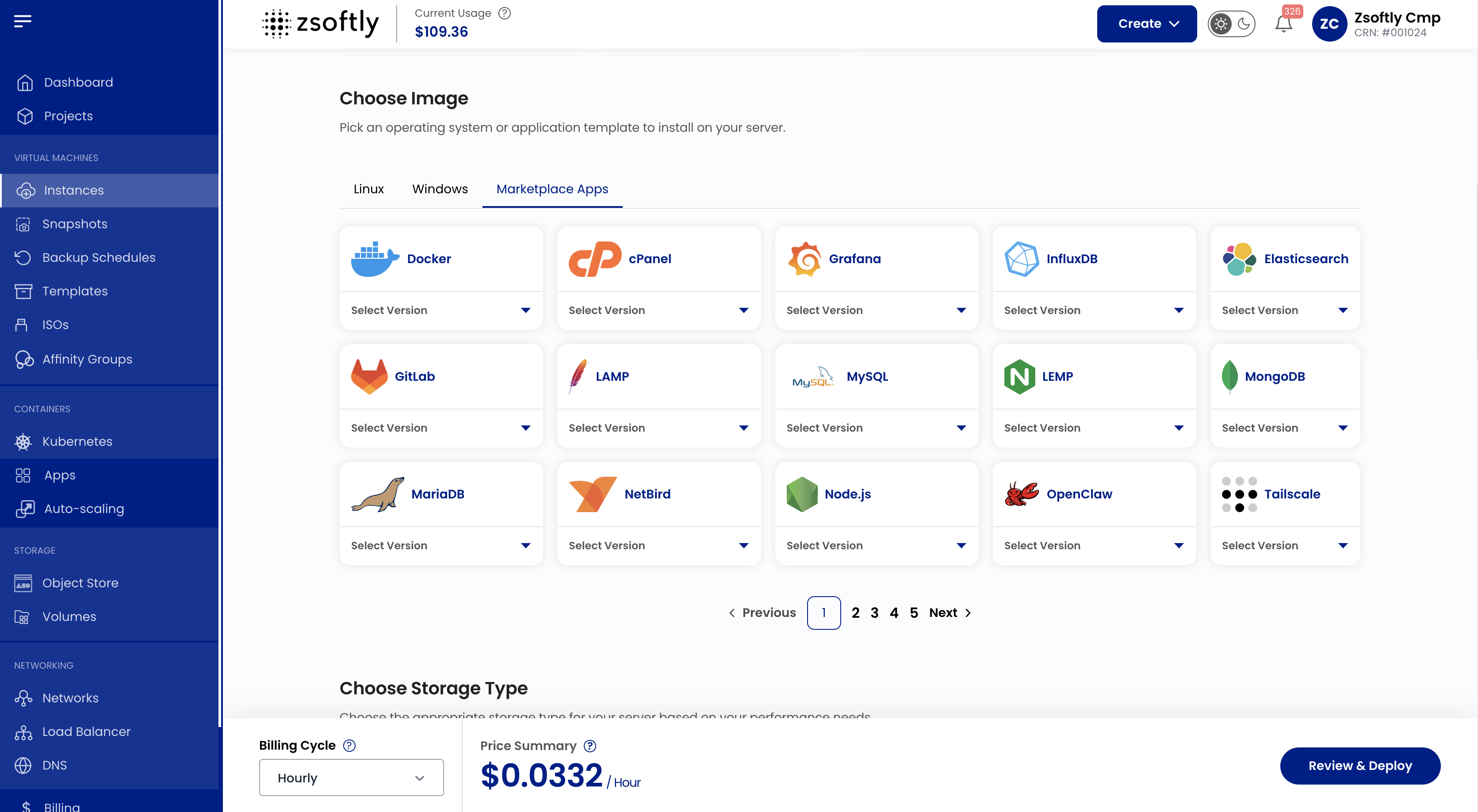
Each catalog entry has a documented setup path. Every marketplace image ships on Ubuntu 24.04 LTS with a first-boot service. The service completes the image-specific setup when the VM starts for the first time.
During first boot, the setup path handles the image-specific work:
- Finish the application setup.
- Generate credentials when the app needs them.
- Store those credentials in the documented root-only location.
- Start the application service.
For example:
- PostgreSQL generates database credentials and stores them on the VM.
- GitLab runs the initial GitLab reconfigure step and documents where to retrieve the root password.
- Dify installs the application stack for LLM apps, workflows, and retrieval pipelines.
- OpenBao gives you a starting point for secrets management on infrastructure you control.
What we preconfigure
The goal is a clean first boot, not a locked-down black box.
Each template is documented in the ZCP Marketplace docs. The docs show what is included, which versions are available, and what happens on first boot.
They also show where credentials are stored, which service commands matter, and which ports are intentionally closed.
Your team starts from a known baseline instead of a manual install.
Security defaults vary by image, so we document them per app:
- SSH access is available through the VM.
- UFW is enabled on images needing host firewall protection.
- Some web application ports are open by default so the app works after deployment.
- Database and internal service ports are usually restricted until you allow trusted sources.
- Generated secrets are stored on the VM in the location listed by the docs.
- You review each app’s docs before deciding what to expose, restrict, or close.
This matters. A fast deployment still needs a deliberate exposure decision.
How to choose an image
Start with the job the VM needs to do.
Use a runtime template when you want a base for your own application: Docker, Node.js, LAMP, LEMP, Nginx, HAProxy, or Apache Tomcat.
Use a database template when you want the data service on its own VM: PostgreSQL, MySQL, MariaDB, MongoDB, Valkey, Elasticsearch, ClickHouse, InfluxDB, Neo4j, Qdrant, SeaweedFS, and others.
Use a DevOps template when the VM is part of your delivery system: GitLab, Jenkins, Forgejo, Gitea, Harbor, Nexus, Artifactory, Portainer, Rancher, RabbitMQ, or Kafka.
Use a security or VPN template when you need identity, secrets, or private connectivity: Keycloak, Authentik, OpenBao, Vaultwarden, NetBird, Tailscale, Headplane, or WG-Easy.
Use a business app template when you want a ready internal tool: ERPNext, Zammad, Mattermost, Wiki.js, n8n, Medusa, Bagisto, or NocoDB.
Use an AI template when you want tools closer to your data: Ollama for local model serving, Dify for LLM app workflows, or OpenClaw for automation and integrations.
When not to use the marketplace
Use the marketplace when you want a fast, documented starting point.
Use a plain OS image when you need one of these:
- A custom hardening baseline
- A specific package version outside the catalog
- An image built from your own CI pipeline
- An application topology planned across several VMs from day one
Both options are valid. The catalog removes repetitive setup. It does not hide the infrastructure.
The full catalog
The table below is a reference index for the 64 live app templates. For setup steps, credentials, service commands, and security notes, use the linked docs page for each entry.
Control Panels
For hosting providers and teams managing many websites from one interface.
| Image | What it is for |
|---|---|
| cPanel | Web hosting control panel with WHM. |
Web Servers
For public sites, reverse proxies, load balancers, and application runtimes.
| Image | What it is for |
|---|---|
| LAMP Stack | Classic Linux, Apache, MariaDB, and PHP stack. |
| LEMP Stack | Nginx-based PHP application stack. |
| Nginx Proxy Manager | Reverse proxy and SSL management with a web UI. |
| Nginx | High-performance web server and reverse proxy. |
| HAProxy | TCP and HTTP load balancing. |
| Apache Tomcat | Java servlet container for web applications. |
CMS
For content sites, publishing workflows, and marketing pages.
| Image | What it is for |
|---|---|
| WordPress | The world’s most widely used content management system. |
| Drupal | Flexible CMS for content-heavy sites and applications. |
| Ghost | Publishing platform for blogs, newsletters, and memberships. |
Developer Tools
For code hosting, CI/CD, container management, package storage, and platform teams.
| Image | What it is for |
|---|---|
| Docker | Docker CE and Docker Compose on a VM. |
| Node.js 24 | Node.js runtime with process management. |
| GitLab CE 19.1 | Self-hosted Git, CI/CD, issues, and registry. |
| Jenkins | Automation server for builds and deployments. |
| Forgejo | Lightweight self-hosted Git forge. |
| Gitea | Lightweight Git service for small teams and projects. |
| Portainer | Web UI for Docker, Swarm, and Kubernetes management. |
| Coolify | Self-hosted PaaS for apps, databases, and services. |
| Rancher | Kubernetes management console. |
| RabbitMQ | Message broker for queues and event-driven systems. |
| Apache Kafka | Event streaming platform for real-time data. |
| Nexus | Artifact repository for builds and dependencies. |
| Artifactory | JFrog artifact repository for packages and binaries. |
| Harbor | Container registry with security-focused workflows. |
| Directus | Headless CMS and data platform on SQL databases. |
| Pterodactyl | Game server management in isolated containers. |
| Pelican Panel | Open-source control panel for game servers. |
Databases
For stateful services on dedicated VMs. Attach block storage before production use.
| Image | What it is for |
|---|---|
| MariaDB 11.8 | Open-source relational database and MySQL replacement. |
| PostgreSQL | Relational database with strong extensibility. |
| MySQL | Widely deployed open-source relational database. |
| Valkey 9.1 | Redis-compatible in-memory data store. |
| Elasticsearch 9 | Search and analytics engine. |
| InfluxDB 2 | Time series database for metrics and events. |
| MongoDB 8.0 | Document database for JSON-like data. |
| Supabase | Open-source Firebase alternative built on PostgreSQL. |
| Qdrant | Vector database for semantic search and retrieval. |
| NocoDB | Airtable-style interface on top of databases. |
| SeaweedFS | Distributed file and object storage. |
| Neo4j | Graph database for connected data. |
| ClickHouse | Column-oriented OLAP database for analytics. |
Business Apps
For internal tools, commerce systems, documentation, support, and collaboration.
| Image | What it is for |
|---|---|
| n8n | Workflow automation with a visual editor. |
| Medusa | Headless commerce engine. |
| Bagisto | Laravel-based e-commerce platform. |
| ERPNext | ERP, CRM, accounting, HR, and inventory. |
| Zammad | Helpdesk and ticketing platform. |
| Mattermost | Team messaging and collaboration. |
| Wiki.js | Self-hosted wiki and documentation platform. |
Security and VPN
For identity, private access, secrets, passwords, and encrypted connectivity.
| Image | What it is for |
|---|---|
| NetBird | WireGuard overlay network. |
| Tailscale | WireGuard-based VPN for devices and servers. |
| Headplane | Web UI for self-hosted Headscale. |
| Keycloak | Identity and access management with SSO. |
| Authentik | Identity provider for SSO, OAuth, and SAML. |
| Vaultwarden | Lightweight Bitwarden-compatible password manager. |
| OpenBao | Secrets management and encryption. |
| WG-Easy | WireGuard VPN with a web UI. |
Monitoring
For dashboards, alerting, uptime checks, and host-level visibility.
| Image | What it is for |
|---|---|
| Grafana | Dashboards for metrics, logs, and traces. |
| Prometheus | Metrics collection and alerting. |
| Zabbix | Infrastructure and application monitoring. |
| Uptime Kuma | Uptime checks and status dashboards. |
| Beszel | Lightweight real-time server monitoring. |
| Gatus | Automated service health dashboards. |
AI and Agents
For LLM workflows, local model serving, and self-hosted automation close to your data.
| Image | What it is for |
|---|---|
| OpenClaw | Self-hosted assistant and integration gateway. |
| Ollama | Local LLM runtime and API. |
| Dify | LLM apps, workflows, RAG, and agent building. |
What to do after launch
After the VM starts:
- Read the matching marketplace docs page.
- SSH into the VM and confirm the first-boot service completed.
- Retrieve generated credentials from the documented location.
- Change default or generated passwords where the application expects it.
- Review which ports are already open, then close, restrict, or expose only what the application needs.
- Attach block storage before production use if the application holds important state.
- Create a backup or snapshot policy before production use.
- Put the app behind a domain and TLS endpoint before sharing it with users.
The fastest launch is still the one you know how to operate later.
Get started
Create a VM, open the Marketplace Apps tab, choose an app, then follow its docs page. Browse the ZCP Marketplace overview, read the full Marketplace documentation, or launch from the portal at cloud.zcp.zsoftly.ca.