


ZCP self-signup asks one billing question: Prepaid or Postpaid. Those are the only two options at cloud.zcp.zsoftly.ca/register. A third option, Manual, exists outside self-signup entirely and is set up only through the ZCP sales team. This post explains what each mode means, so the choice at signup is informed instead of a guess.
The choice is made once, at signup
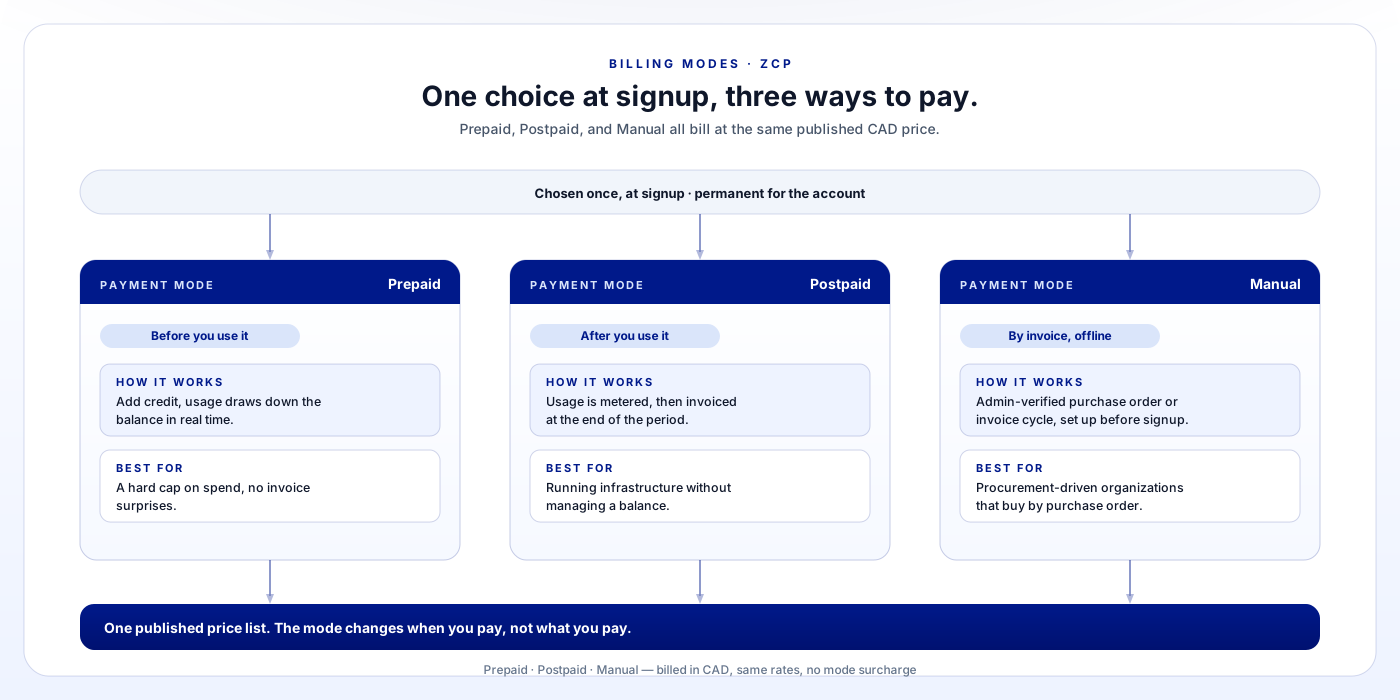
When you create an account, you select Prepaid or Postpaid before you provision anything. Those are the two options self-signup offers. That choice is permanent for the account, and there is no self-service switch between modes later, so it is worth understanding the difference before you click confirm.
Eligible new accounts also receive CA$100 in launch promotional credit, valid for 30 days, with up to CA$300 in promotional credit available in total through December 31, 2026. Promotional credit behaves the same way regardless of which mode you pick. Once it is used or it expires, billing continues in whichever mode you selected at signup.
Prepaid: you fund the account, usage draws it down
Prepaid is a balance you fund upfront. You load it with credit, and usage draws down that balance as you go.
To activate a Prepaid account, you make a minimum CA$1.00 verification payment. That amount goes into your account credit and stays available to spend. It is not a separate fee on top of your balance. From there, running instances, storage, and other billed resources draw against the credit you hold. The portal shows the balance in real time.
Prepaid suits accounts that want a hard ceiling on spend by design. There is no credit line behind it, so you cannot run up a bill larger than the credit you have added. If the balance runs out, new usage pauses until you top up the account.
Postpaid: you use first, we bill after
Postpaid flips the order. Usage is metered through a billing period. You pay for what you used after the fact, instead of drawing down a balance you loaded in advance.
This suits accounts that want to run infrastructure without managing a prepaid balance day to day. The tradeoff is no hard spend ceiling built into the mode. If cost predictability matters to you specifically as a spend cap rather than as a published price list, Prepaid is the better fit. If what matters to you is transparent pricing billed in CAD, either mode gives you that. See the pricing page for the underlying rates regardless of which mode you choose.
An unpaid Postpaid invoice risks account suspension, the same way it would with any invoiced service. Keep a valid payment method on file to avoid an interruption.
Manual: arranged through sales, not self-signup
Manual billing does not appear anywhere in self-signup. It exists only as an offline, admin-verified arrangement, for organizations whose procurement process requires a purchase order, a signed contract, or an invoice cycle that a card-based signup cannot accommodate.
To set it up, contact sales before creating an account. Sales configures the arrangement first, then provisions the account under it. Signing up through Prepaid or Postpaid and switching to Manual afterward is not an option.
Which one should you pick
Self-signup supports Prepaid and Postpaid. Manual runs through sales instead. With that settled, here is how to choose:
- Prepaid if you want spend capped at whatever you have loaded, with no possibility of a surprise invoice.
- Postpaid if you would rather run infrastructure without managing a balance, and you are comfortable paying after usage instead of before it.
- Manual if your organization buys software by purchase order or invoice and a card-based signup does not fit your procurement process.
Whichever you pick, pricing itself does not change. Every ZCP price is public on the pricing page, billed in CAD, with no hidden fees layered on top depending on payment mode. The mode changes when you pay, not what you pay.