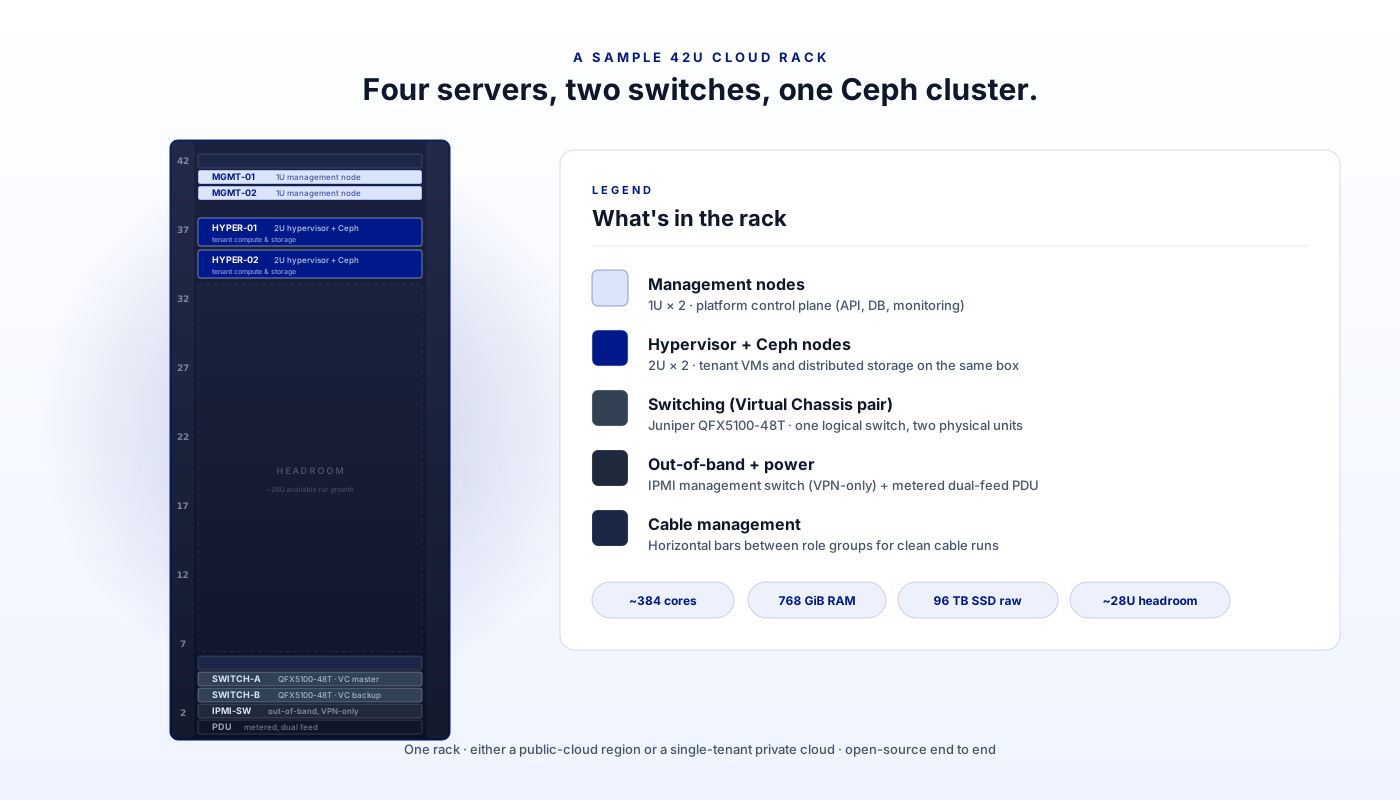
The rack below is a realistic, build-it-today reference for a small cloud region or a private cloud: four servers, two switches in a Juniper Virtual Chassis pair, a Ceph cluster across them, and roughly 384 cores in the rack. It is the kind of footprint any operator puts together at a Montreal colocation. The same build delivers either a public-cloud region or a single-tenant private cloud, depending on what sits on top.
And this is what the shape looks like once racked, cabled, and powered on: a representative rear view of the four servers stacked at the top with cable management between them, the Juniper Virtual Chassis switch pair below, and the cabling running cleanly between them.
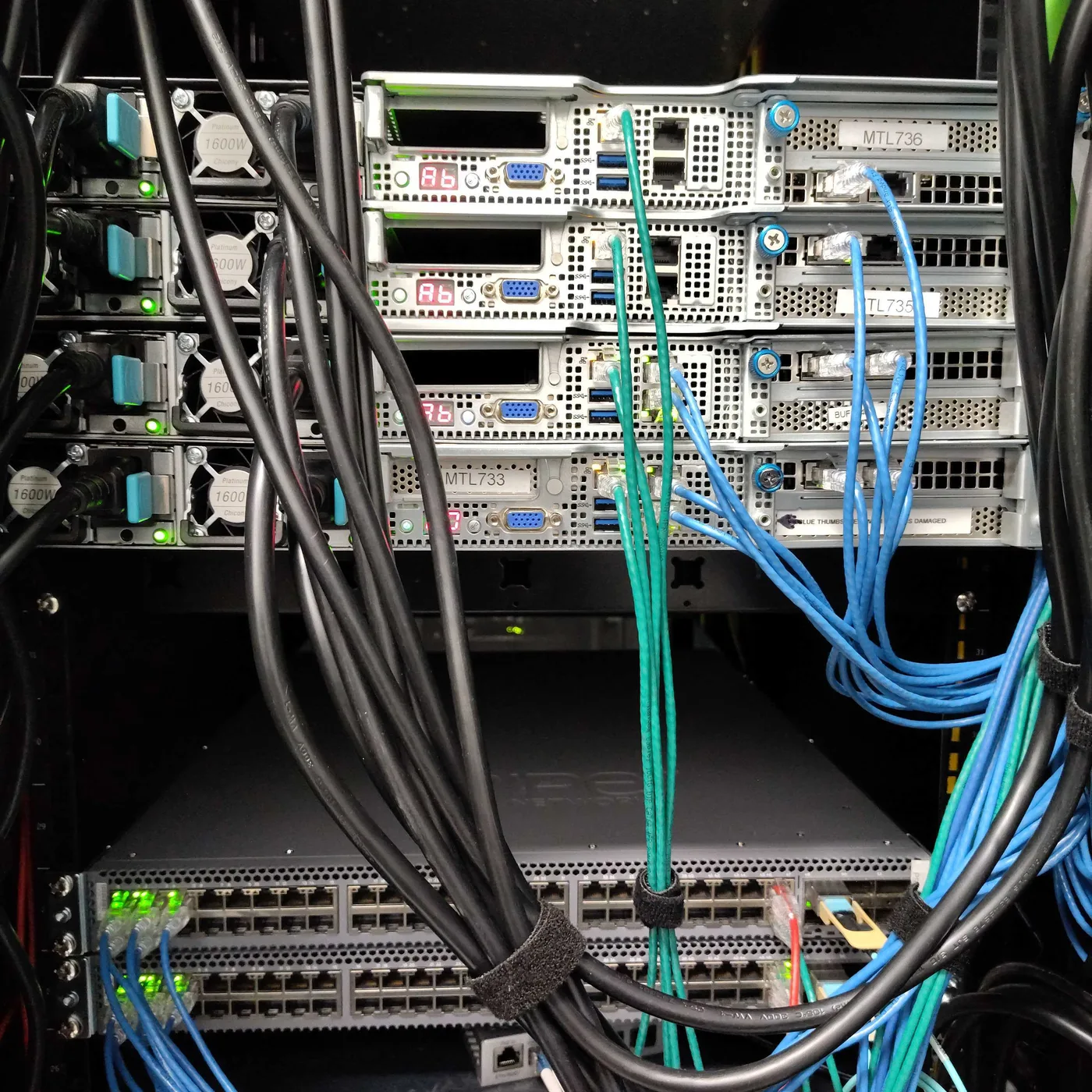
Installed rack, rear view. The diagram above maps directly onto this physical layout.
The site is a carrier-neutral Tier 3 colocation in Montreal. The rack is a standard 42U / 19” with redundant power and metropolitan-IX network presence. None of this is exotic. The interesting parts are what goes in the rack, who you sign the contract with, and what it pays back over five to ten years against the alternative.
The role split: management vs hypervisor
Four servers sit in two roles.
Two management nodes (1U each) run the platform control plane: the cluster operating the management-plane containers and VMs, IaaS control plane management, the database tier, the API gateway, observability, and the supporting services making the rack a cloud region. They are deliberately smaller because they run control-plane workloads, not tenant compute.
Two hypervisor nodes (2U each) run the tenant workloads, KVM hypervisors plus Ceph OSD daemons. These boxes host customer VMs and store customer data.
Two management + two hypervisor is the minimum sensible shape. Two of each lets you take one node down for maintenance without losing the role. The same shape scales up, three or four hypervisor nodes for higher density, more racks for more regions, without changing the architecture.
What is inside each server
| Component | Management (1U) | Hypervisor (2U) |
|---|---|---|
| CPU | 2× AMD EPYC 7642 (96C / 192T) | 2× AMD EPYC 7642 (96C / 192T) |
| Memory | 128 GiB DDR4 ECC RDIMM | 256 GiB DDR4 ECC RDIMM |
| OS / boot | 2× 1 TB NVMe M.2 | 2× 4 TB NVMe M.2 (boot + cache) |
| Tenant storage | N/A | 6× 8 TB SSD (Ceph OSD candidates) |
| Network | 2× 10 GbE (LACP bond) | 4× 10 GbE (2× onboard + 2× add-in) |
| BMC | ASRock Rack (HTML5 KVM) | ASRock Rack (HTML5 KVM) |
The EPYC choice is deliberate. AMD-V, AMD-Vi (IOMMU), and SEV are all present, which matters for KVM virtualization and for the per-tenant isolation features Ceph and the hypervisor rely on. 96 cores per server gives the hypervisor nodes headroom to run dense VM workloads without scheduling pressure. The 6× 8 TB SSDs on the hypervisor nodes become Ceph OSDs, 48 TB of raw tenant storage per node, replicated across the cluster.
There is no RAID. Redundancy lives at the Ceph layer for tenant data and at the service layer (paired infra nodes running active/passive HA) for the management plane.
Switching: one logical chassis, two physical units
The two switches at the bottom of the rack are Juniper QFX5100-48T, configured as a Virtual Chassis pair. Member 0 is the master routing engine, and member 1 is the backup. From an operator’s perspective there is one switch with one config. From a redundancy perspective there are two physical units, and every server LAG is dual-homed, one leg on member 0, one leg on member 1. Losing either physical unit does not lose the network.
The QFX VC is mostly Layer 2. The only Layer 3 work it does is for the public uplink. Everything else routes through OPNsense in software, which gives programmable firewall rules, NAT, and inter-VLAN policy without pushing state into the hardware. IPMI is a separate physical path entirely, BMC ports on every server go to a dedicated management switch reachable only through a VPN.
Network: five purposeful VLANs
The trunk between servers and the QFX VC carries five VLANs, each with a single job.
- INFRA, DNS, NTP, monitoring, network gear management.
- MGMT, Cluster traffic and Corosync. Cluster-membership keepalives.
- STORAGE, Ceph and NFS, tuned with jumbo frames (MTU 9000) to keep replication efficient.
- DMZ, public service pool for workloads needing internet access without living on the public IP block directly.
- PUBLIC, colocation public uplink, carrying the cluster’s /27 of public IPv4 and the /30 transit link.
OPNsense routes between them. Paired OPNsense firewalls run CARP/HAProxy for active/passive failover. This is the layer where tenant-to-tenant isolation, ingress firewalling, and per-tenant network policy live.
Software stack on top
The rack runs four open-source projects. Every piece is intentional:
- Proxmox VE on the management nodes, operates the control-plane containers and VMs.
- Apache CloudStack as the IaaS control plane, exposes the API, the portal, and orchestrates the hypervisors.
- KVM on the hypervisor nodes, runs tenant VMs.
- Ceph on the hypervisor nodes, provides distributed block (RBD) and S3-compatible object (RGW) storage, replicated across the cluster.
- OPNsense + WireGuard for L3, firewalling, and inter-zone VPN.
Open source end to end. No proprietary agents inside customer workloads, no per-core licence on the hypervisor, no closed-source storage controller. Workloads come in and out as standard QCOW2 / RAW images and S3 buckets.
What this rack runs
Add up the four servers and the rack has roughly 384 physical cores / 768 threads, 768 GiB of RAM, 96 TB of raw SSD storage, and 10 GbE uplinks from every hypervisor node. After Ceph 3× replication, usable tenant storage is in the 30+ TB range. With appropriate erasure-coding pools, usable storage increases.
In practice this is enough for a meaningful production tenant load: tens of medium-sized VMs, a managed Kubernetes cluster or two, S3-compatible object storage for backups and media, and the full set of platform services (load balancers, VPC, IAM, DNS), with headroom for a maintenance event. All five of the cloud service categories, MaaS, IaaS, PaaS, plus the platform services around them, come out of the same rack.
Two shapes: hyperconverged or disaggregated
The four-node rack above is the hyperconverged shape. The hypervisor nodes do both jobs at once, they run KVM for tenant compute and host Ceph OSDs for tenant storage. This keeps the node count low, the rack-unit footprint tight, and the per-host cost amortised across both workloads. It is the default for small-to-medium clouds because it scales linearly: every node you add brings more compute and more storage.
For larger or specialised builds, split the roles.
Disaggregated uses more nodes, each with a single job. Compute nodes get fast CPU + RAM and minimal local disk. Storage nodes get dense disk shelves and run nothing but Ceph. This is the right shape when storage needs to scale independently of compute, for example, an analytics workload storing petabytes but only running a few hundred cores against it, or a compute-dense AI workload needing every available core in the rack for inference while a smaller dedicated tier holds the training data. Disaggregated also lets you tier storage explicitly: an NVMe-only tier for hot data, an HDD tier for archive, both on their own dedicated nodes.
Hyperconverged stacks more roles on fewer boxes. The four-node configuration in this rack is the entry point. Two-node and three-node hyperconverged clusters work for small private deployments where the operational simplicity of one server class beats the efficiency of role separation. Three nodes is the sensible Ceph quorum minimum.
Same software stack underneath either way. CloudStack and Ceph do not care whether OSDs share a node with KVM hypervisors or live on separate hardware, the cluster topology is a configuration choice, not a different product. We pick the shape during the architecture workshop based on the workload mix: hot:cold storage ratio, compute density, growth curve, and the customer’s preference between fewer-but-bigger nodes and more-but-specialised nodes.
The rest of this post uses the hyperconverged four-node shape as the cost baseline because it is the most common starting point. The math scales the same way for both, you trade a higher node count for cleaner role isolation, but the per-resource economics are the same.
What it costs
You sign one contract, with us. ZSoftly handles the colocation, the hardware procurement, the network gear, the refresh cycles, and the operations. You pay a published monthly rate in CAD and never see the supplier invoices behind it.
Our Private Cloud Build-Out tiers cover this shape directly:
| Tier | One-time setup | Managed (monthly) | Zones | Nodes |
|---|---|---|---|---|
| Starter | $4,500 | $1,200 | 1 | up to 3 |
| Standard | $12,000 | $2,800 | 1-2 | up to 10 |
| Enterprise | Custom | Custom | 3+ | Unlimited |
The four-node rack in this post fits the Standard tier (1-2 zones, up to 10 nodes), with room to grow to a second zone or to scale node count without changing tiers.
| Standard tier total | 5 years | 10 years |
|---|---|---|
| Setup (one-time) | $12,000 | $12,000 |
| Managed service (monthly) | $168,000 | $336,000 |
| Total in CAD | ~$180,000 | ~$348,000 |
This covers the hardware in the rack, the colocation facility, redundant power, bandwidth, switching, monitoring (Prometheus + Grafana + Alertmanager), inter-zone WireGuard VPN, a 99.5% SLA on Standard, and ZSoftly engineers operating the platform end to end. One bill, predictable for the length of the contract, with no FX exposure.
There is no per-core licence, no proprietary agent installation, no hardware-refresh CapEx surprising you in year four. If you outgrow Standard you move to Enterprise (multi-region, customer-supplied colocation if you have a preferred facility, managed Kubernetes layer, dedicated engineer). The rack underneath stays the same.
The hyperscaler alternative
Same workload on AWS. The cleanest single-instance reference is m6a.metal, a bare-metal general-purpose instance with the following spec:
- 192 vCPUs on an AMD EPYC 7R13 at 3.6 GHz (96 physical cores / 192 threads, 4 NUMA nodes).
- 768 GiB of RAM (4 GiB per vCPU).
- 50 Gibps network bandwidth, EBS-optimised up to 40 Gbps / 240,000 IOPS.
- No local storage: zero NVMe, zero SSD, zero attached devices. Every byte you persist lives on EBS or S3.
- Starting at $8.2944 / hour (on-demand, US East, Linux).
This matches the rack’s 768 GiB RAM almost exactly. On core count, the rack has roughly 4× the cores of one m6a.metal (rack ~768 vCPU-equivalent threads versus 192 on m6a.metal). One m6a.metal is the RAM-matched reference. Two-to-four m6a.metal instances are the core-matched reference for the same delivered capacity. And m6a.metal alone delivers no storage at all. The rack’s 96 TB of integrated SSD has no direct equivalent at this AWS price.
AWS’s published m6a.metal pricing (2026-05, US East, Linux):
| Term | Hourly | Annual |
|---|---|---|
| On-Demand | $8.2944 | $72,658.944 |
| 1-Year Reserved | $5.4867 | $48,063.93 |
| 3-Year Reserved | $3.7624 | $32,958.098 |
| Spot (volatile) | $2.0895 | $18,304.195 |
This is compute only, no storage, no egress, no managed services. A realistic AWS bill for the workload this rack delivers adds those back. EBS alone is non-trivial because the rack’s 96 TB of integrated SSD has to be re-purchased as a separate AWS line item:
| AWS line item (2026-05) | Annual |
|---|---|
| 1× m6a.metal (RAM-matched, 1-yr RI) | ~$48k |
| OR 2× m6a.metal (closer to core-matched, 1-yr RI) | ~$96k |
| OR 1× m6a.metal at on-demand | ~$73k |
| EBS gp3, 30 TB usable | ~$29k |
| S3 standard, 10 TB | ~$3k |
| Egress: 50 TB / month at $0.09 / GB (the typical pain point) | ~$54k |
| Data transfer between AZs / regions / VPN egress | ~$6k-$12k |
| Realistic total (1× m6a.metal + storage + egress, 1-yr RI) | ~$140k-$150k |
| Realistic total (2× m6a.metal core-matched + storage + egress, 1-yr RI) | ~$190k-$200k |
| Realistic total (1× m6a.metal at on-demand + storage + egress) | ~$165k-$175k |
Five-year ranges: ~$700k-$1.0M on AWS depending on whether you size for RAM or cores and whether you commit to a Reserved Instance.
Compare to the ZSoftly Standard tier: ~$180k over 5 years, ~$348k over 10 years, including the colocation, the network gear, the hardware refresh cycle, the monitoring stack, and ZSoftly engineers operating the platform. On AWS at on-demand, the same compute alone, without storage or egress, without operations, without anyone on the line at 2 a.m., costs more than the entire ZSoftly contract does end to end.
The big-ticket numbers are real and unavoidable. Egress alone is ~$54k / year at modest traffic volumes included with the rack. Reserved-instance commitments help on compute, but you cannot reserve-instance your way out of egress, premium storage tiers, or the per-feature billing on managed services. And the moment you need bare-metal capacity at AWS, for nested virtualisation, custom kernel modules, or true single-tenant isolation, m6a.metal pricing is the floor, not the ceiling.
What this translates to
A consistent 4× to 5× cost differential over 5 to 10 years for the same delivered capacity, depending on comparison sizing and reservation terms accepted on the AWS side. The differential is largest for egress-heavy workloads (CDN origin, ML training data, video streaming) and for workloads benefiting from bare-metal AWS pricing tiers like m6a.metal. The ZSoftly contract also covers every service category, IaaS, PaaS, the platform services around them, plus operations, as one bundle, where on a hyperscaler each one ships with its own line-item billing.
A few honest caveats
These numbers assume steady-state production. A workload with extreme burst (10× peaks, idle troughs) is genuinely cheaper on a hyperscaler. Hyperscalers are built for this pattern. A dedicated rack does not auto-scale to zero. It costs the same in February as it does in November. (The hybrid pattern addresses this: keep the burst on the hyperscaler, run the baseline on ZCP.)
The ZSoftly rate already includes the operations. ZSoftly engineers patch the hypervisors, rotate storage, renew certs, and respond to alerts under the SLA. A team rolling its own would carry this cost separately.
And the numbers ignore the migration cost of getting onto either platform. Both have one. Our step-by-step migration guide walks through this path for VMware-origin workloads.
Public cloud or private cloud, same rack, different layer on top
The rack underneath does not change between products. The IaaS control plane, the Ceph cluster, the OPNsense routing, the QFX VC pair, all the same. What differs is the layer on top:
- Public cloud: a Cloud Management Platform sits above CloudStack and handles self-service signup, hourly billing, the customer portal, the public marketplace, and the multi-tenant RBAC story.
- Private cloud: the CMP layer goes away. The customer owns the tenancy outright. The API and CLI are the same. The workloads run the same way. What changes is who owns the contract on the rack and the keys to the BMC.
This equivalence is why the same engineering team operates both. The platform is the asset. The delivery layer is a wrapper.
Reference, not recipe
If you are sizing something similar, the specs above are a reasonable starting point, not the only viable shape. Two-node clusters work for small private deployments. Three-node Ceph clusters get you to a sensible quorum at minimum cost. Six- and twelve-node racks scale up the same shape when capacity demands it. The principle carries through: two server roles (management vs hypervisor), one Virtual Chassis switch pair, an out-of-band IPMI path, and a small number of purposeful VLANs.
If you want this built, for a private cloud or as a colocated extension to your existing footprint, our Private Cloud Build-Out team does the work. You scope the outcome. We pick the stack, source the gear, install it in the colocation you specify, and operate it from there.
Sources and further reading
- Apache CloudStack and the API reference.
- Ceph documentation, RBD, RGW, CRUSH, and replication models.
- Juniper QFX5100 Series hardware reference and Virtual Chassis configuration.
- OPNsense documentation.
- AWS m6a.metal pricing on Vantage and AWS m6a.16xlarge pricing on Vantage, the hyperscaler pricing references for the cost section. ZSoftly Private Cloud Build-Out tiers are published on our pricing page.
- Companion post: One foundation, two products, what the CMP layer adds on top of this same rack to deliver a public cloud.